Help Center
Settings – Action Statuses
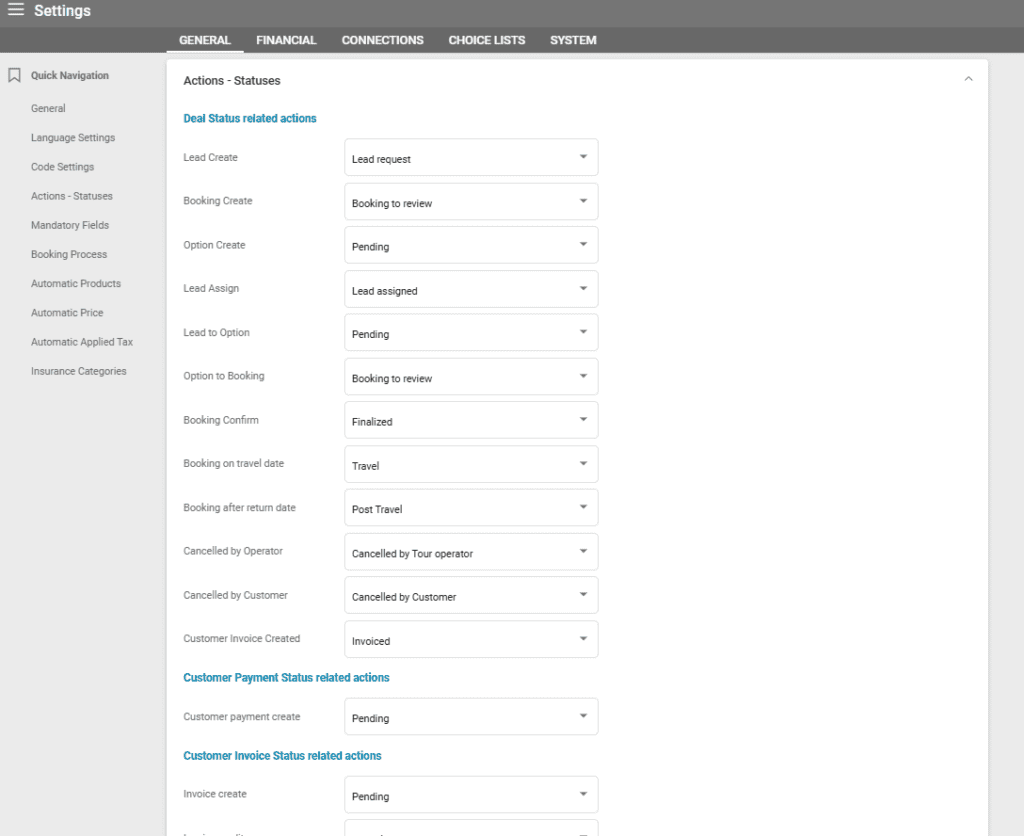
The Statuses tab should be used to establish the relationship between certain actions within the system and the status of items. For instance, when a Deal is created, its status will be marked as Pending if this option is selected from the dropdown menu.
Deal Status Related Actions
- Lead Create – The status of a Lead when it is created.
- Booking Create – The status of a Deal when it is created.
- Option Create – The status of an Option type deal when it is created.
- Lead Assign – The status of a Lead when it is assigned to another user.
- Lead to Option – The status of a deal when a Lead is converted to an Option.
- Option to Booking – The status of a deal when an Option is converted to a Booking.
- Booking on Travel Date – The status of a deal when its start date is the current date.
- Booking after Return Date – The status of a deal when the return date has passed.
- Cancelled by Operator – The status of a deal when it is cancelled by the operator.
- Cancelled by Customer – The status of a deal when it is cancelled by the customer.
- Customer Invoice Created
Customer Payment Status Related Actions:
- Customer Payment Create – The status of the Customer Payment when a Deal is created and the Customer Payment entry is added to the Customer Payment List.
Customer Invoice Status Related Actions:
- Customer Invoice Create – The status of the invoice when it is created.
- Customer Invoice Credit – The status of the invoice when a credit note is created.
- Invoice Partial Payment – The status of the invoice when a partial payment is received.
- Invoice Full Payment – The status of the invoice when full payment is received.
Supplier Invoice Status Related Actions:
- Supplier Invoice Create – The status of the supplier invoice when it is created.
Supplier Invoice – Arrangement Status related actions
- Supplier Invoice final create – The status of the arrangement when creating a final supplier invoice.
- Supplier invoice credit – The status of the arrangement when crediting a supplier invoice.
Supplier Order – Order Status related actions
- Supplier order create – The status of the order when creating a supplier order.
- Supplier order email / host2host booking created – The status of the order when creating an order email or host2host booking.
- Supplier quote email / host2host booking created – The status of the order when creating a quote email or host2host booking.
- Supplier Order confirm – The status of the order when confirming a supplier order.
- Supplier Order decline – The status of the order when a supplier order is declined.
- Supplier Order cancel – The status of the order when cancelling a supplier order.
Supplier Order – Arrangement Status related actions
- Supplier order create – The status of the arrangement when creating a supplier order.
- Supplier order email / host2host booking created – The status of the arrangement when creating an order email or host2host booking.
- Supplier quote email / host2host booking created – The status of the arrangement when creating a quote email or host2host booking.
- Supplier Order confirm – The status of the arrangement when confirming a supplier order.
- Supplier Order decline – The status of the arrangement when a supplier order is declined.
- Supplier Order cancel – The status of the arrangement when cancelling a supplier order.
Statuses are selectable and can be modified in the respective choice lists but come predefined when the account is set up.