
Deals – Refund Handling After Deal Cancellation
Cancelling a deal does not trigger automatic financial refunds.
Once a deal is cancelled:
- There are no more automated payment reminders or emails sent
- It is excluded from reports/statistics
But already issued invoices or registered payments are NOT reversed automatically.
When a deal that has already been fully paid is canceled, the original customer payment is no longer considered valid. However, the system does not automatically remove or reverse the payment. Future payments are stopped (communication-wise). Therefore, to properly reflect the refund, a negative payment equivalent must be recorded manually by the operator.
Creating a Refund via Cancellation Arrangement
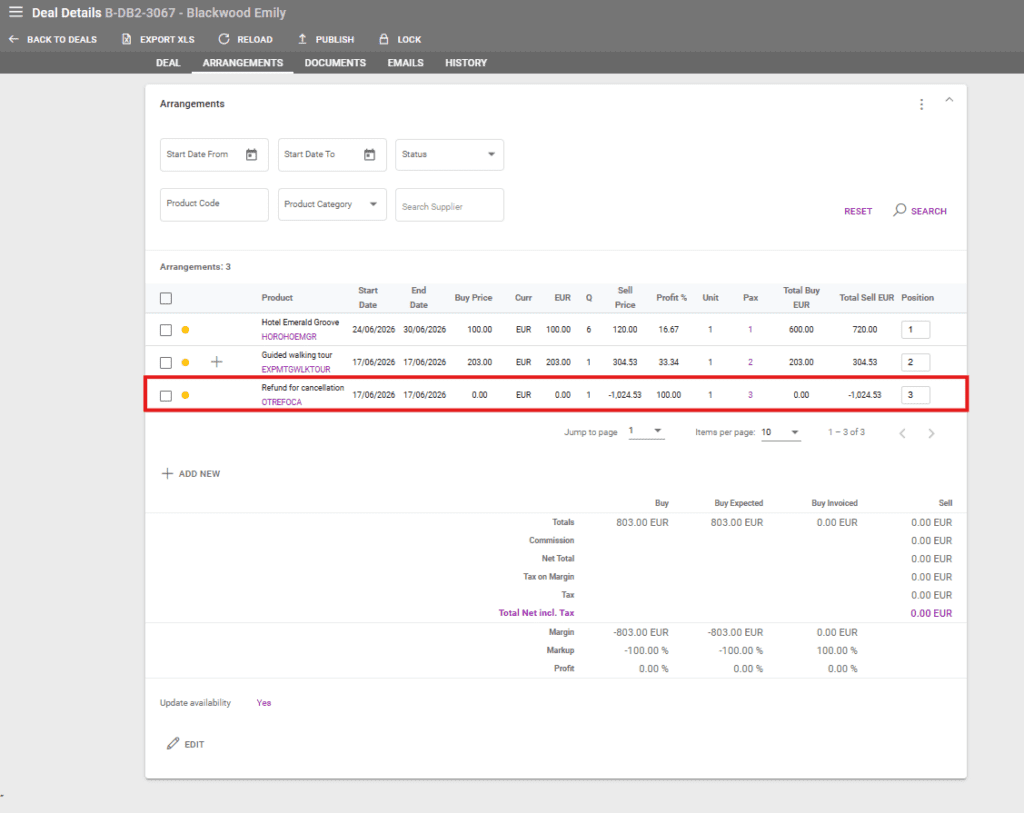
To generate the correct financial outcome, the operator must add a cancellation arrangement to the deal with a negative price.
The negative amount should exactly match the amount to be refunded.
Handling Cancellation Insurance
Resulting this, the system creates a customer payment record with a negative value to offset the original payment.
If the deal includes cancellation insurance arrangements that are still payable, these amounts must remain unchanged, the cancellation insurance having to retain a positive value. In this case, the cancellation arrangement negative value should exclude the value of the cancellation insurance.
Important Notes
By canceling a deal alone, the system does not trigger a refund. Refunds must be reflected through manual financial adjustments.
Always ensure that:
- The negative cancellation arrangement matches the refund amount exactly
- Any non-refundable components (e.g. insurance) remain positive
Therefore, to correctly process a refund after cancellation, the steps to follow by the operator are::
- Cancel the deal
- Add a negative cancellation arrangement equal to the refund
- Keep any cancellation insurance amounts positive
