Help Center
Prices – Delete All Prices from a Search in Prices Listing
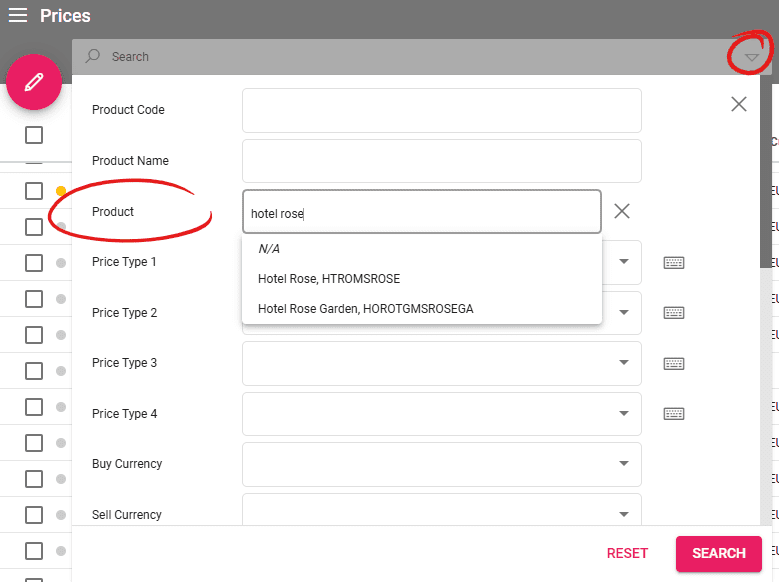
Searching using a specific product in the Price Listing enables an option in the pencil sub-menu to delete all searched prices. The input in the Product search field can be a product code or a product name. A list of products will be displayed depending on the text input. Select the product and set other filters if needed, then click on Search. This will show all the prices related to that product.
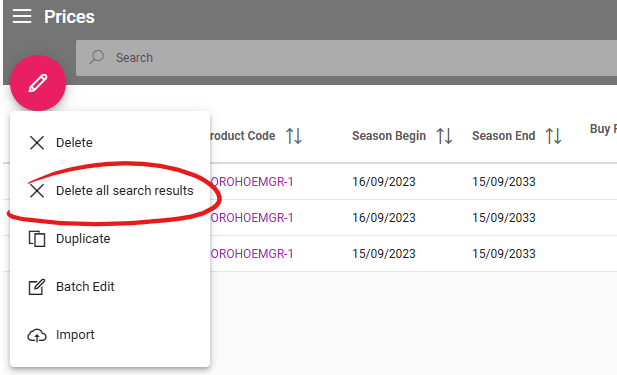
Click on the Pencil icon to see the new functionality that deletes all the search results. A window will be displayed in the lower right corner with information about the number of deleted prices, and the prices that couldn’t be deleted. The prices that have related Arrangements or Availabilities will be skipped from the deletion process.