
Help Center
Deals – Create A Duplicate Deal
This feature allows the operator to duplicate an existing deal.
Duplicating a Deal
From the Deals list, select the Deal to be duplicated and click on the Edit sign:
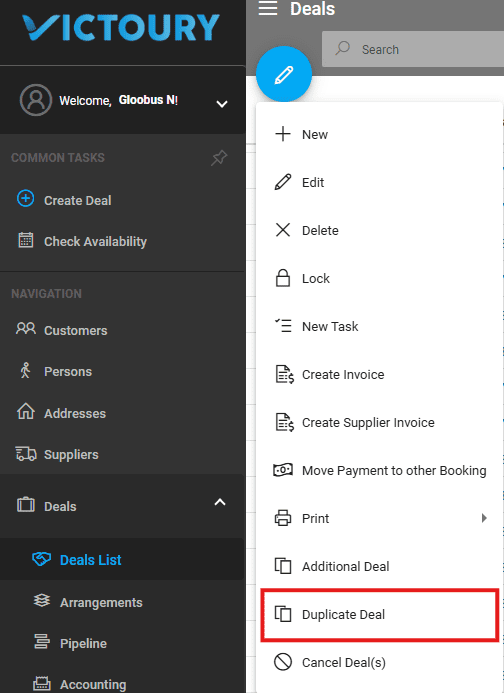
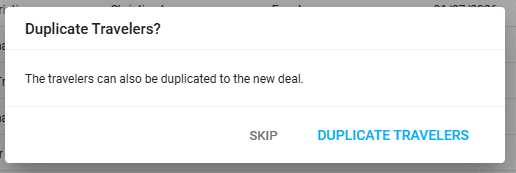
The system will ask if you also want to duplicate the travelers.
- If you choose ‘yes,’ the travelers will be included in the new deal.
- If you choose ‘no,’ only the customer will be kept, with no travelers assigned.
Further, the system inquires whether you wish to update availability for the deal’s arrangements.
Lastly, a verification message is displayed before proceeding with the deal duplication.
Accessing the New Deal
Once the deal is duplicated, a new Deal of Type – O (Optional) will be created with a new, distinct code.

After the duplicate deal is created, you may change the customer if necessary, as explained in the “Change Customer” article.
General Details
- The type of the duplicated deal will be Option (O).
- The code of the duplicated deal will be the next available number (as per code settings).
- The customer in the duplicated deal will be the same as in the original deal.
- The billing address will remain as in the original deal.
- The duplicated deal will include:
- The arrangements of the original deal.
- The itineraries from the original deal.
- The destinations of the original deal.
- When creating the duplicated deal:
- If the travelers are not duplicated, then no travelers and no assignments in the Arrangement list will be included in the new deal.
- If the travelers are duplicated, the persons from the original deal will become the new travelers and will be assigned to the arrangements as in the original deal.
- The duplicated deal will not have customer invoices, supplier invoices, or accounting created.
- The duplicated deal will not have customer payments.
- The author of the duplicated deal will be the currently logged-in user.
- The brand of the deal will be the same as that of the original deal.
- If the original deal includes a trip, the duplicated deal will also include a trip.
